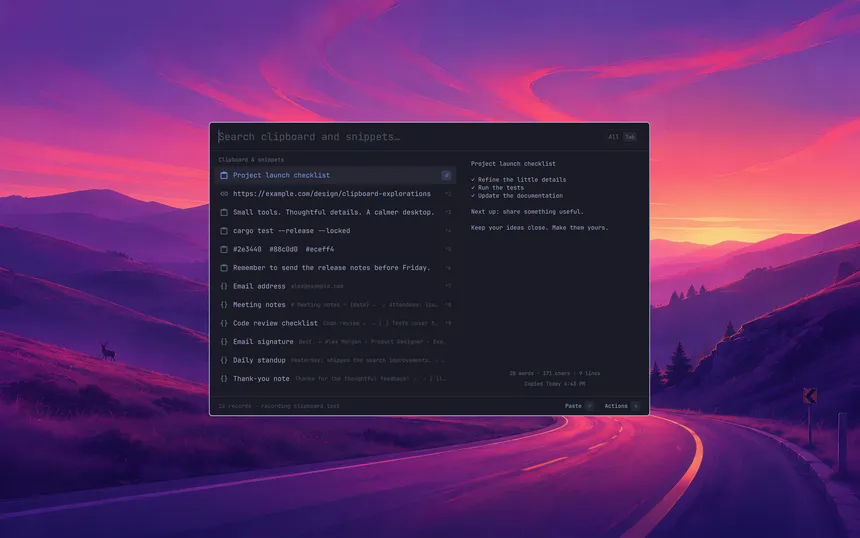
I copy and paste the same handful of things all day: email addresses, shell commands, boilerplate replies, that one URL I can never remember. I wanted a clipboard manager that felt like it belonged on the Omarchy desktop, so I started building Snipboard.
What it does
Press a shortcut and a compact picker appears in the middle of the screen, floating over whatever you were doing without dimming it. It’s one search line over a list of results, with a preview of the selected item on the right. The preview shows word and character counts and when you copied it.
Clipboard history and saved snippets share the same search, so you don’t have to remember which one something lives in. From there:
Enterpastes the selection straight into the window you were just usingCtrl+1throughCtrl+9paste by positionTabcycles between all results, history only, and snippets only→orCtrl+Kopens actions for the selected item: copy, save as a snippet, edit, duplicate, delete, and more
It works with a mouse too, and the colors follow your active Omarchy theme.
Snippets that do a little more
Any clipboard entry can be saved as a snippet with one keystroke. Snippets can also include a few variables that fill in when you paste:
{clipboard}inserts whatever is currently on your clipboard{cursor}puts the caret at that spot after pasting, so a template can drop you right where you need to type
Pasting is smart about terminals: regular apps get Ctrl+V, and terminals get Ctrl+Shift+V.
Your data stays yours
While the plugin is running it records text you copy, so it’s worth saying plainly how that’s handled:
- Everything stays in owner-only files on your machine. There’s no telemetry and nothing is uploaded.
- Copies that the source app marks as sensitive (like many password managers) are skipped.
- History is capped at 1,000 items or 30 days, whichever comes first.
- You can delete any entry from history, and disabling the plugin stops recording entirely.
Where it’s at
Snipboard is a working prototype, not a first release yet. Text history, search, snippet editing, and pasting all work today. A few things are still on the roadmap:
- Typed keyword expansion, like typing
!emailin any app to expand a snippet - Image history and richer previews for links and files
- A sync folder for keeping snippets in step across machines
Try it
You’ll need Omarchy with its plugin-capable shell and wl-clipboard, on a Linux x86_64 machine. The repository ships a prebuilt worker, so there’s no Rust toolchain or build step. Install and enable it with one command:
omarchy plugin add https://github.com/jwkicklighter/omarchy-snipboard --enableInstalling doesn’t add a keyboard shortcut, so bind one in your Hyprland config to open the picker. I use Super+Shift+V:
omarchy-shell shell summon io.github.jwkicklighter.snipboard '{}'The README has the full details.
If you try it, I’d love to hear how it goes. Bug reports and ideas are welcome over on GitHub issues.